오늘은 이전에 포스팅한 나만의 AI 에이전트 OpenClaw 구축하기의 활용편을 작성하였습니다.
외부 서비스에 의존하지 않는 로컬 LLM 와 연동 방법과 공개된 Skill 을 추가하여 발전된 형태의 AI 에이전트로 업그레이드 시켜보겠습니다.
로컬LLM 이란?
로컬 LLM(Local Large Language Model)은 클라우드 서비스 (OpenAI, Google, Anthropic 등)를 사용하지 않고
자체 서버 또는 개인 PC에서 직접 실행하는 AI 모델을 의미합니다.
✔ 기존 방식 (클라우드 LLM) 사용자 → 인터넷 → OpenAI API → 결과 반환
✔ 로컬 LLM 방식 사용자 → 내부 서버 → 로컬 모델 → 결과 반환
로컬 LLM의 핵심 특징으로는
✅ 장점 데이터 보안: 외부로 데이터 유출 없음 비용 절감: API 사용료 없음 (초기 GPU 비용 제외) 커스터마이징 가능: 모델 튜닝, 내부 시스템 연동 자유 오프라인 사용 가능
❌ 단점 초기 구축 난이도 높음 특정 제조사의 GPU 자원 필요 모델 성능이 최신 클라우드 대비 부족할 수 있음
로컬 LLM 실행 엔진
로컬 LLM을 실제로 구동하려면 “추론 엔진”이 필요합니다. 대표적으로 아래 두 가지가 많이 사용됩니다:
vLLM
Ollama
vLLM 는 대형 언어 모델(LLM)을 고성능으로 서빙 하기 위해 만들어진 오픈소스 추론 엔진입니다.
쉽게 말해서, ChatGPT 같은 모델을 빠르고 효율적으로 API 형태로 제공하기 위한 백엔드 엔진 입니다.
Ollama 는 내 PC에서 ChatGPT 같은 LLM을 쉽게 실행하게 해주는 로컬 AI 런타임” 입니다.
vLLM vs Ollama 핵심 비교
항목
vLLM
Ollama
목적
고성능 서버 추론
간편한 로컬 실행
대상
기업 / 서버 환경
개인 / 개발자
설치 난이도
높음
매우 쉬움
성능
매우 높음
중간
GPU 활용
최적화
제한적
API 제공
OpenAI 호환
자체 API
멀티 유저
강력
제한적
모델 관리
직접 관리
자동 다운로드
이후 설명하는 OpenClaw 활용에서도 vLLM 을 활용하여 로컬 모델을 사용해보겠습니다.
vLLM 설치하기
테스트 환경에서는 WSL Ubuntu 24.04 를 사용하여 구성하였습니다.
UV 패키지 관리자 설치
curl -fsSL https://llmfit.axjns.dev/install.sh | sh

downloading uv 0.11.2 x86_64-unknown-linux-gnu
installing to /home/user/.local/bin
  uv
  uvx
everything's installed!

To add $HOME/.local/bin to your PATH, either restart your shell or run:

    source $HOME/.local/bin/env (sh, bash, zsh)
    source $HOME/.local/bin/env.fish (fish)
-----------------------------------------------------------------------

환경 변수 추가
source $HOME/.local/bin/env

파이썬 구성 & vLLM 설치
uv venv --python 3.12 --seed
uv add --dev python 3.12
source .venv/bin/activate
uv pip install vllm --torch-backend=auto
sudo apt install -y python3.12-dev
NVIDIA CUDA 구성
vLLM 은 CUDA 12.8 까지 사용 가능합니다.

wget https://developer.download.nvidia.com/compute/cuda/repos/wsl-ubuntu/x86_64/cuda-wsl-ubuntu.pin
sudo mv cuda-wsl-ubuntu.pin /etc/apt/preferences.d/cuda-repository-pin-600
wget https://developer.download.nvidia.com/compute/cuda/12.8.1/local_installers/cuda-repo-wsl-ubuntu-12-8-local_12.8.1-1_amd64.deb
sudo dpkg -i cuda-repo-wsl-ubuntu-12-8-local_12.8.1-1_amd64.deb
sudo cp /var/cuda-repo-wsl-ubuntu-12-8-local/cuda-*-keyring.gpg /usr/share/keyrings/
sudo apt-get update
sudo apt-get -y install cuda-toolkit-12-8

export PATH=${PATH}:/usr/local/cuda-12.8/bin
export LD_LIBRARY_PATH=${LD_LIBRARY_PATH}:/usr/local/cuda-12.8/lib64
로컬 LLM 모델 선정
LLM 서비스 구성을 위해서는 현재 자신의 시스템에 맞는 모델을 선정하는것이 매우 중요합니다.
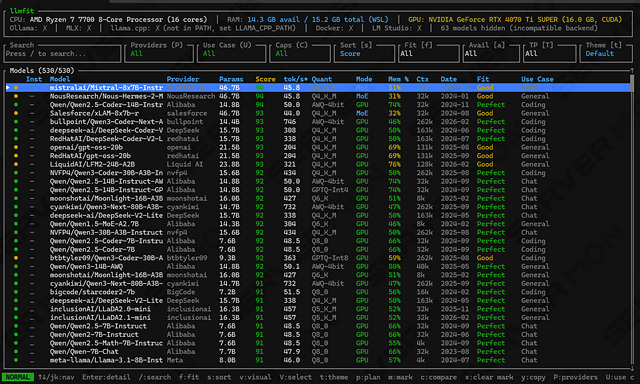
편의성을 위해 llmfit 이라는 도구를 사용하여 현재 시스템에 맞는 모델을 선정 하겠습니다.
llmfit 설치
curl -fsSL https://llmfit.axjns.dev/install.sh | sh

모델 확인
llmfit
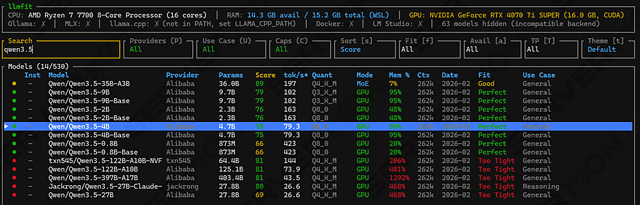
lmmfit 을 통해 수백 개의 LLM 모델과 제공자를 대상으로, 내 시스템 RAM·CPU·GPU에서 실제로 실행 가능한 모델을 한 번의 명령으로 찾아볼 수 있습니다.
모델별로 실행 모드(GPU, CPU+GPU) 와 적합 수준(Perfect, Good, Marginal, Too Tight) 을 분석해 최적 조합을 제시합니다
이번 연동에는 Qwen3.5 - 4B 모델을 선택 하였습니다.
Qwen3.5 모델?
1. Qwen 3.5는 언제, 누가 만들었을까? 개발사: 알리바바 그룹 (Tongyi Lab, Qwen 팀) 출시일: 2026년 2월 16일 (초대형 플래그십 모델 최초 공개), 이후 2월 25일에 경량화 모델(122B~0.8B) 라인업 대거 추가 공개.
탄생 배경: 이전 세대 대비 비용은 60% 절감하면서 대규모 작업 처리 능력은 8배 향상시키는 것을 목표로 개발되었습니다. 특히 모바일이나 PC 화면을 스스로 이해하고 조작하는 '시각적 에이전트(Visual Agentic)' 기능을 전면에 내세우며, GPT-5.2나 Claude 4.5 Opus 등 현존하는 최상위 모델들과 경쟁하고 있습니다.
2. Qwen 3.5 시리즈의 4가지 핵심 특징 네이티브 멀티모달 (Native Multimodal):
텍스트와 비전(이미지, 비디오) 데이터를 처음부터 혼합 학습하여, 별도의 텍스트 변환 없이도 시각적 이해 및 복잡한 STEM 문제 해결 능력이 매우 뛰어납니다.
에이전트 기능 특화 (Agent Enhancement):
인간의 개입 없이 모바일이나 데스크탑 UI를 읽어내고, 버튼을 클릭하며, 다단계 워크플로우를 스스로 수행할 수 있는 '행동하는 AI'에 최적화되어 있습니다.
MoE 구조를 통한 고효율 추론:
수천억 개의 파라미터를 가졌음에도 질문의 종류에 따라 일부 전문가(Expert) 파라미터만 활성화하는 희소(Sparse) MoE 구조를 채택해, 연산 속도는 높이고 서버 비용은 획기적으로 낮췄습니다.
방대한 컨텍스트와 다국어 지원:
무려 201개의 언어를 지원하며, 상용 API 버전에서는 최대 100만(1M) 토큰에 달하는 초장문 문맥을 기억하고 한 번에 처리할 수 있습니다.
Qwen 3.5 모델 라인업 및 파라미터 비교
알리바바는 기업의 가용 예산과 하드웨어 환경에 맞춰 선택할 수 있도록 매우 세분화된 모델 사이즈를 오픈소스로 제공합니다.
모델명
총 파라미터 수
활성 파라미터(Active)
아키텍처
Qwen3.5-397B-A17B
3,970억 개 (397B)
170억 개 (17B)
MoE
Qwen3.5-122B-A10B
1,220억 개 (122B)
100억 개 (10B)
MoE
Qwen3.5-35B-A3B
350억 개 (35B)
30억 개 (3B)
MoE
Qwen3.5-27B
270억 개 (27B)
270억 개 (27B)
Dense
Qwen3.5 Small (9B, 4B, 2B, 0.8B)
0.8B ~ 9B
0.8B ~ 9B
Dense
로컬 LLM 모델 구성
선정한 LLM 모델을 구성합니다.
vLLM 모델 서빙
OpenClaw 와 연동을 위해 연동 인자 추가
vllm serve "Qwen/Qwen3.5-4B" --tool-call-parser hermes --enable-auto-tool-choice

###################################################################################
(APIServer pid=3621) INFO 03-29 23:36:31 [utils.py:297]
(APIServer pid=3621) INFO 03-29 23:36:31 [utils.py:297]        █     █     █▄   ▄█
(APIServer pid=3621) INFO 03-29 23:36:31 [utils.py:297]  ▄▄ ▄█ █     █     █ ▀▄▀ █  version 0.18.0
(APIServer pid=3621) INFO 03-29 23:36:31 [utils.py:297]   █▄█▀ █     █     █     █  model   Qwen/Qwen3.5-4B
(APIServer pid=3621) INFO 03-29 23:36:31 [utils.py:297]    ▀▀  ▀▀▀▀▀ ▀▀▀▀▀ ▀     ▀
(APIServer pid=3621) INFO 03-29 23:36:31 [utils.py:297]
(APIServer pid=3621) INFO 03-29 23:36:31 [utils.py:233] non-default args: {'model_tag': 'Qwen/Qwen3.5-4B', 'enable_auto_tool_choice': True, 'tool_call_parser': 'hermes', 'model': 'Qwen/Qwen3.5-4B'}
(APIServer pid=3621) INFO 03-29 23:36:34 [model.py:533] Resolved architecture: Qwen3_5ForConditionalGeneration
(APIServer pid=3621) INFO 03-29 23:36:34 [model.py:1582] Using max model len 262144
중략
(APIServer pid=3621) INFO 03-29 23:39:38 [parser_manager.py:202] "auto" tool choice has been enabled.
(APIServer pid=3621) INFO 03-29 23:39:39 [api_server.py:580] Starting vLLM server on http://0.0.0.0:8000
(APIServer pid=3621) INFO 03-29 23:39:39 [launcher.py:37] Available routes are:
(APIServer pid=3621) INFO:     Started server process [3621]
(APIServer pid=3621) INFO:     Waiting for application startup.
(APIServer pid=3621) INFO:     Application startup complete.
###################################################################################
로컬 모델 테스트
curl -X POST "http://localhost:8000/v1/chat/completions" \
	-H "Content-Type: application/json" \
	--data '{
		"model": "Qwen/Qwen3.5-4B",
		"messages": [
			{
				"role": "user",
				"content": [
					{
						"type": "text",
						"text": "Describe this image in one sentence."
					},
					{
						"type": "image_url",
						"image_url": {
							"url": "https://cdn.britannica.com/61/93061-050-99147DCE/Statue-of-Liberty-Island-New-York-Bay.jpg"
						}
					}
				]
			}
		]
	}'| jq

{
  "id": "chatcmpl-9c29c1af88b94756",
  "object": "chat.completion",
  "created": 1774795251,
  "model": "Qwen/Qwen3.5-4B",
  "choices": [
    {
      "index": 0,
      "message": {
        "role": "assistant",
        "content": "The user wants a one-sentence description of the image.\n\n1.  **Identify the main subjects:** The Statue of Liberty in the foreground (left-center) and the New York City skyline in the background.\n2.  **Identify the setting:** The statue is on an island in the water (Stockholm/Govener's Neck), separated from the Manhattan skyline by the Hudson River or Upper New York Bay.\n3.  **Note lighting/atmosphere:** It looks like late afternoon or early morning sunlight, casting a warm glow on the buildings and the statue. The sky is clear blue.\n4.  **Drafting sentences:**\n    *   *Draft 1:* The Statue of Liberty stands on its base in the water, with the New York City skyline behind it. (A bit simple)\n    *   *Draft 2:* A serene view of the Statue of Liberty on Liberty Island with the Manhattan skyline, including the Empire State Building, rising in the background across the water. (Good, specific)\n    *   *Draft 3:* The iconic Statue of Liberty overlooks the Hudson River, facing the illuminated New York City skyline on a sunny day. (Accurate)\n    *   *Draft 4:* The image captures the massive Statue of Liberty standing on its pedestal in the water, with the glittering skyscrapers of the Manhattan skyline stretching across the horizon behind it. (Descriptive)\n\n5.  **Refining for flow and accuracy:** The statue is facing *towards* the viewer slightly, looking at the skyline. The Empire State Building is clearly visible. The water is blue.\n    *   *Final Polish:* The iconic Statue of Liberty stands majestically on its base in the water, facing the sprawling skyline of New York City, with the Empire State Building prominently visible among the skyscrapers under a clear blue sky.\n\nLet's try to make it even more concise.\n\"The Statue of Liberty stands on Liberty Island in the water, gazing toward the New York City skyline which features the Empire State Building under a clear, sunny sky.\"\n\nLet's stick to a descriptive overview.\n\n*   \"The iconic Statue of Liberty stands on Liberty Island in the water, with the New York City skyline stretching across the background under a clear blue sky.\" -> This is solid.\n\nLet's add a bit about the lighting.\n\"The image features the Statue of Liberty on Liberty Island overlooking the New York City skyline, bathed in the warm light of late afternoon with the Empire State Building standing tall in the distance.\"\n\nLet's go with a balanced approach.\n\n**Final Selection:** The image displays the Statue of Liberty standing prominently on its base in the water, with the sprawling New York City skyline, featuring the Empire State Building, rising in the background under a clear blue sky.\n\n\nThe image displays the Statue of Liberty standing prominently on its base in the water, with the sprawling New York City skyline, featuring the Empire State Building, rising in the background under a clear blue sky.",
        "refusal": null,
        "annotations": null,
        "audio": null,
        "function_call": null,
        "tool_calls": [],
        "reasoning": null
      },
      "logprobs": null,
      "finish_reason": "stop",
      "stop_reason": null,
      "token_ids": null
    }
  ],
  "service_tier": null,
  "system_fingerprint": null,
  "usage": {
    "prompt_tokens": 1670,
    "total_tokens": 2297,
    "completion_tokens": 627,
    "prompt_tokens_details": null
  },
  "prompt_logprobs": null,
  "prompt_token_ids": null,
  "kv_transfer_params": null
}

최종 토큰 속도와 물음에 대한 답변을 받을 수 있습니다.
웹 브라우저를 통해 http://127.0.0.1:18789/ 에 접속하여 신규 추가한 모델과 대화를 하였습니다.
OpenClaw 기능 업그레이드
OpenClaw를 더욱 강력하게 만드는 비결은 바로 ClawHub에 있습니다.
ClawHub는 OpenClaw 에이전트가 사용할 수 있는 다양한 '스킬(Skills)'들이 모여 있는 저장소이자 관리 플랫폼입니다.
마치 스마트폰의 앱스토어처럼, 필요한 기능을 골라 에이전트에게 장착시킬 수 있습니다.
OpenClaw는 기본적으로 강력한 검색 기능을 내장하고 있지만
AI 에이전트 전용 검색 엔진인 Tavily를 연동하면 검색의 질이 한층 업그레이드됩니다.
Tavily는 불필요한 광고나 노이즈를 제거하고 AI가 이해하기 가장 좋은 형태의 데이터만 추출해 주기 때문에,
에이전트의 답변 정확도를 크게 높일 수 있습니다.
1. Clawhub 유틸 설치
clawhub 유틸 설치
npm i -g clawhub

tavily 유틸 검색 & 설치
clawhub search tavily
clawhub install openclaw-tavily-search
2. Tavily API 키 발급받기 Tavily를 스킬을 사용하기위 API 키를 확보해야 합니다. Tavily AI 공식 홈페이지 에 접속하여 회원가입을 진행합니다. 대시보드에서 제공되는 API Key를 복사하여 메모해 둡니다. (무료 플랜에서도 월 1,000건의 검색을 지원합니다.)
3. Tavily API 키 적용하기
vim ~/.openclaw/workspace/skills/openclaw-tavily-search/.env

복사해둔 API 키를 넣어줍니다
export TAVILY_API_KEY="tvly-YOUR_API_KEY"

openclaw gateway restart

openclaw skills list
┌───────────────┬───────────────────────┬──────────────────────────────────────────────────────────────────────────────────────────────┬────────────────────┐
│ Status        │ Skill                 │ Description                                                                                  │ Source             │
├───────────────┼───────────────────────┼──────────────────────────────────────────────────────────────────────────────────────────────┼────────────────────┤
│ ✓ ready       │ 📦 tavily-search      │ Web search via Tavily API (alternative to Brave). Use when the user asks to search the web / │ openclaw-workspace │
│               │                       │ look up sources / find links and Brave web_search is unavailable or undesired. Returns a     │                    │
│               │                       │ small set of relevant results (title, url, snippet) and can optionally include short answer  │                    │
│               │                       │ summaries.                                                                                   │                    │
└───────────────┴───────────────────────┴──────────────────────────────────────────────────────────────────────────────────────────────┴────────────────────┘
4. Tavily 검색 결과
OpenClaw 활용 후기
로컬 LLM 모델 과 추가 스킬을 활용하여 AI 에이전트의 활용도를 높여 보았습니다.
아직 로컬 LLM 모델은 상용AI 모델에 비해 많이 부족한 것이 현실입니다.
제한된 시스템 환경으로 인해 성능 좋은 모델을 사용하지 못했지만, 여러 실험을 통해 로컬 환경에서도 충분히 의미 있는 자동화와 보조 작업이 가능하다는 점을 확인할 수 있었습니다.
아직 로컬 LLM 모델은 상용 AI 모델에 비해 많이 부족한 것이 현실입니다. 마치 성인과 6살 정도의 지능 차이처럼 느껴질 때도 있었고, 특히 복잡한 추론이나 긴 문맥을 이해하는 부분에서는 한계를 체감했습니다.
그럼에도 불구하고 OpenClaw와 같은 도구를 활용하면 단순 질의응답을 넘어서
반복 작업 자동화
시스템 제어 (스크립트 실행, API 호출 등)
커스텀 스킬을 통한 기능 확장
과 같은 영역에서는 충분히 실용적인 결과를 얻을 수 있었습니다.
특히 로컬 환경이라는 점에서
데이터 보안 측면에서 유리하고
네트워크 의존성이 없으며
원하는 방식으로 자유롭게 커스터마이징이 가능하다는 점은 큰 장점이었습니다.
향후 GPU 성능이 더 개선되고, 경량화된 고성능 모델들이 지속적으로 등장한다면 로컬 LLM 기반 AI 에이전트의 활용도는 더욱 높아질 것으로 기대됩니다.
결론적으로 OpenClaw는 “완벽한 AI”라기보다는 “잘 튜닝하면 충분히 쓸 수 있는 실용적인 도구”에 가깝다고 느꼈습니다.
앞으로는 단순한 모델 성능에만 의존하기보다는 스킬 설계, 워크플로우 구성, 그리고 시스템 통합 능력이 AI 활용의 핵심 경쟁력이 될 것이라고 생각합니다.